RetroPC
Amber CRT RetroPC theme for Zed
How to install
With Forge Super installed, the button above opens the app on this extension, where you press Install. Nothing is installed until you do.
You can also open the Extensions panel in the app and search for RetroPC. The extension's id is retropc-theme.
Don't have Forge Super yet? Download it here.
README
From the extension's repository, written by its authors and not by Mentenaz. See the source.
RetroPC for Zed
Amber CRT theme for Zed, inspired by the Omarchy RetroPC theme.
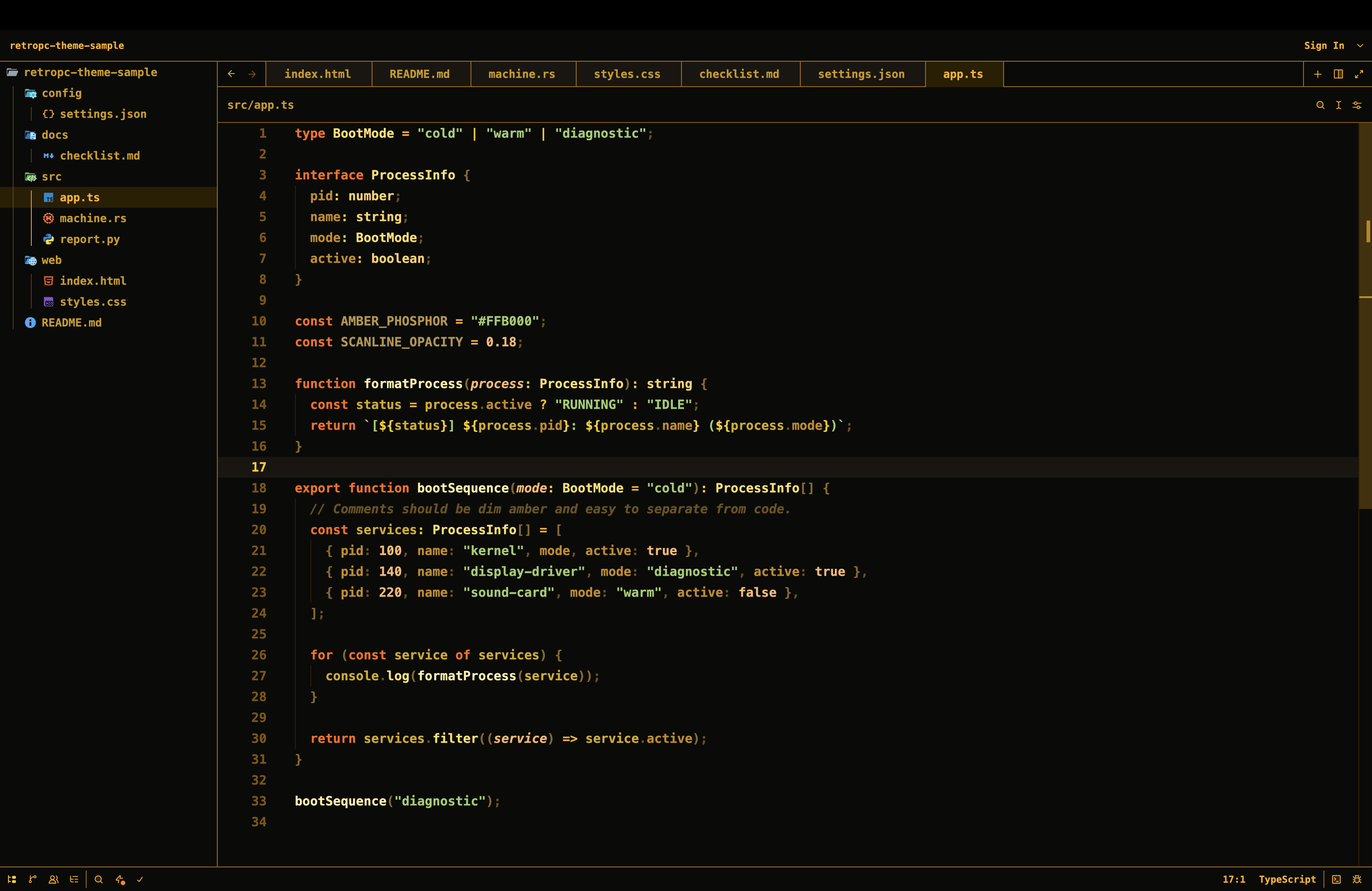
Install
From Zed:
- Open the command palette.
- Run
zed: install dev extension. - Select this repository folder.
- Run
theme selector: toggle. - Choose
RetroPC.
Matching Font
Zed themes cannot set editor fonts or background images directly. To match the
upstream theme more closely, install Bm437 IBM XGA-AI 12x23 and add settings
like:
{
  "buffer_font_family": "Bm437 IBM XGA-AI 12x23",
  "terminal": {
    "font_family": "Bm437 IBM XGA-AI 12x23",
    "minimum_contrast": 0
  }
}
Source
Palette and terminal colors are ported from rondilley/omarchy-retropc-theme.
License
GPL-3.0, matching the upstream source theme.