Python requirements and constraints
Syntax highlighting for requirements.txt and constraints.txt files
How to install
With Forge Super installed, the button above opens the app on this extension, where you press Install. Nothing is installed until you do.
You can also open the Extensions panel in the app and search for Python requirements and constraints. The extension's id is python-requirements.
Don't have Forge Super yet? Download it here.
README
From the extension's repository, written by its authors and not by Mentenaz. See the source.
Python Requirements and Constraints Syntax Highlighting for Zed
Overview
This extension provides syntax highlighting for requirements.txt and constraints.txt files in Zed.
It leverages the tree-sitter-requirements grammar to ensure accurate and visually appealing syntax highlighting.
It also support TODO highlighting using the Comment extension.
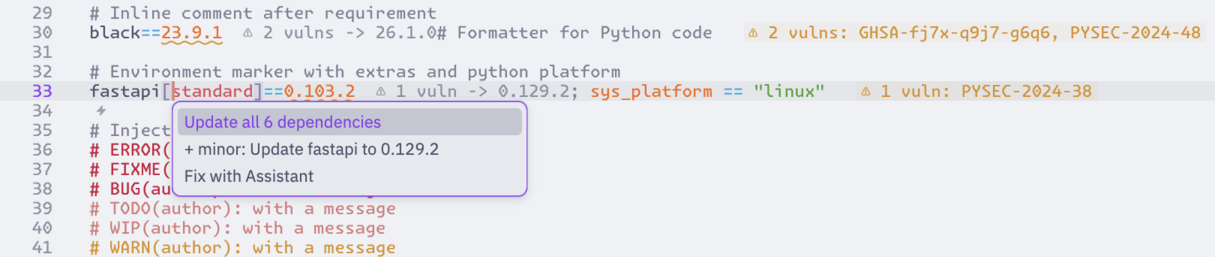
Works best when paired with the Dependi extension to provide inlay hints and diagnostics :
Configuration
Zed does not (yet ?) support registering globs from extensions.
You will need to put these lines in your settings.json :
{
  "file_types": {
    "Python constraints": ["*constraints*.txt"],
    "Python requirements": [
      "**/requirements/*.{in,txt}",
      "*requirements*.{in,txt}"
    ]
  }
}
This should cover the most common cases.
Contributing
If you find any issues or have suggestions for improvements, feel free to open an issue or submit a pull request.
License
This extension is licensed under the MIT License.