Pinkzuna
A Zed theme inspired by the world's first virtual YouTuber, Kizuna AI 🎀
How to install
With Forge Super installed, the button above opens the app on this extension, where you press Install. Nothing is installed until you do.
You can also open the Extensions panel in the app and search for Pinkzuna. The extension's id is pinkzuna-theme.
Don't have Forge Super yet? Download it here.
README
From the extension's repository, written by its authors and not by Mentenaz. See the source.
Pinkzuna
A Zed editor theme inspired by the world's first virtual YouTuber, Kizuna AI.
Two variants — a warm, cheerful light theme and a cold, dramatic dark theme.
Variants
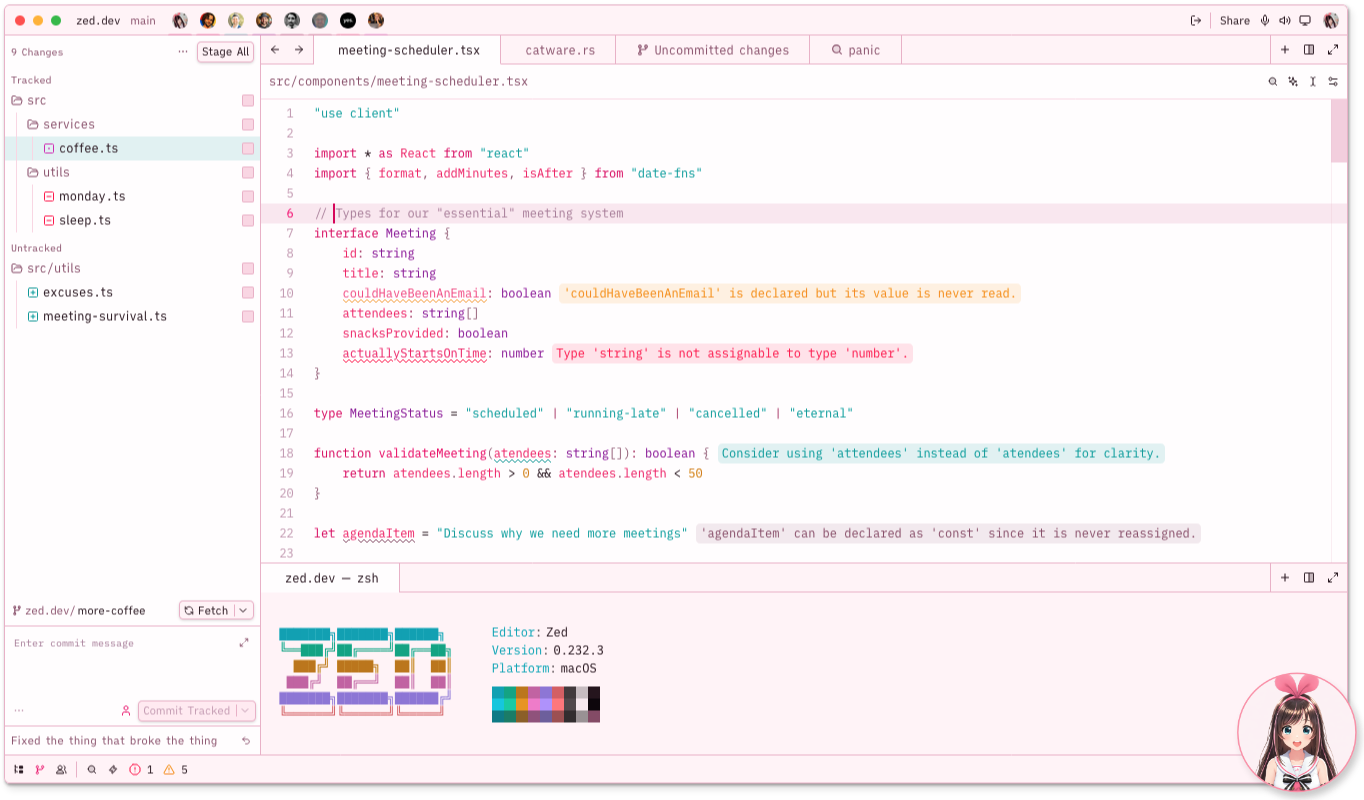
Pinkzuna Classic — Kizuna AI
Warm pinkish-white backgrounds, dark plum foreground, saturated pinks for syntax. Cheerful and bright — daytime Kizuna AI energy.
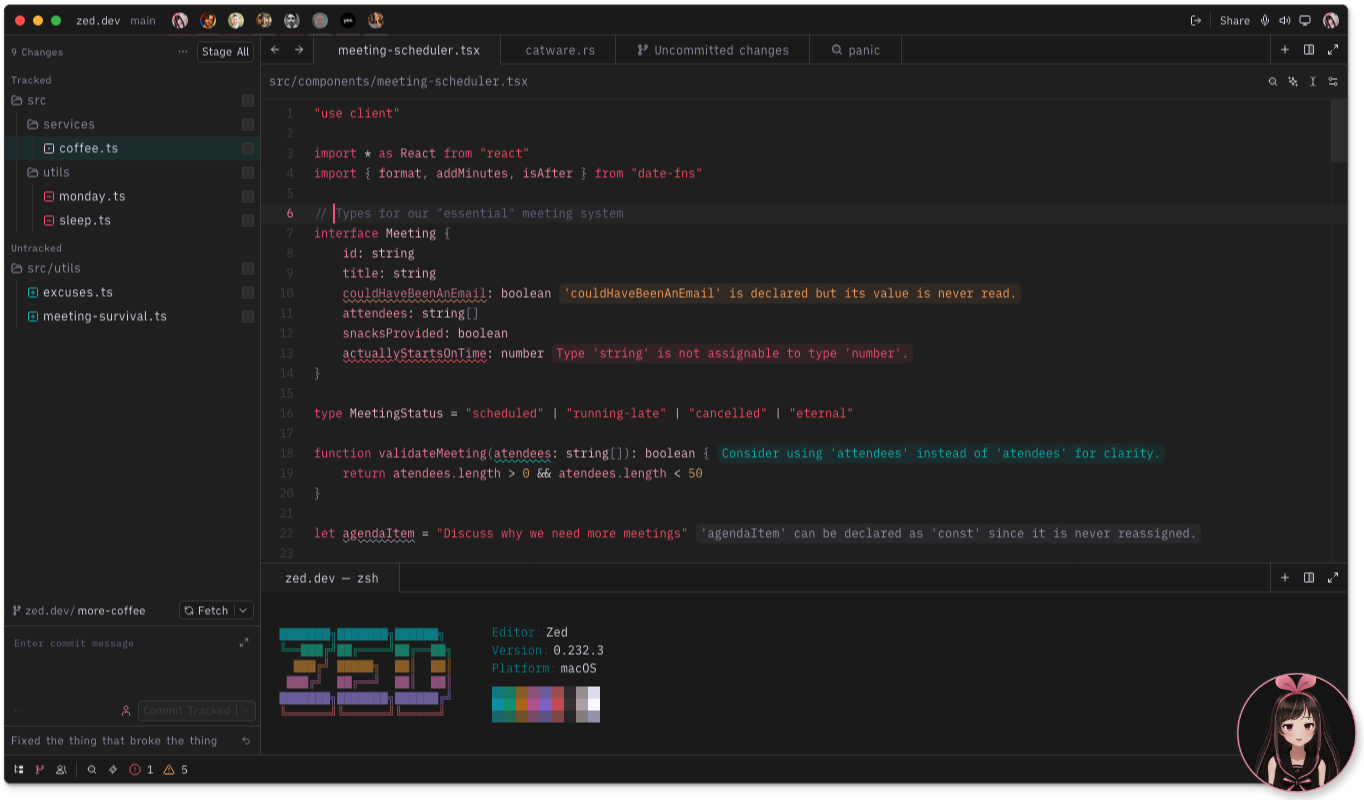
Pinkzuna Black — Black AI
Cold charcoal-black backgrounds, hot-pink syntax anchors, garnet strings. Dramatic and sharp — a tribute to Kizuna's dark doppelganger.
Installation
Via Zed Extension Marketplace (recommended)
- Open Zed and press
Cmd+Shift+X(macOS) /Ctrl+Shift+X(Linux) to open Extensions. - Search for Pinkzuna.
- Click Install.
- Open the theme selector:
Cmd+K Cmd+T→ choose Pinkzuna Classic or Pinkzuna Black.
Manual Installation
- Clone or download this repository:
git clone https://github.com/memiux/pinkzuna-zed.git - Copy the theme file into your Zed themes directory:
cp pinkzuna-zed/themes/pinkzuna.json ~/.config/zed/themes/ - Restart Zed (or reload the window).
- Open the theme selector:
Cmd+K Cmd+T→ choose Pinkzuna Classic or Pinkzuna Black.
Recommended Icon Theme
Pairs beautifully with Charmed Icons.
Add to your settings.json:
"icon_theme": {
  "mode": "dark",
  "light": "Light Charmed Icons",
  "dark": "Soft Charmed Icons"
}
Quick Toggle with Profiles
Set up named profiles in settings.json to switch between Classic and Black in one command:
"profiles": {
  "Light": {
    "theme": "Pinkzuna Classic",
    "icon_theme": "Light Charmed Icons"
  },
  "Dark": {
    "theme": "Pinkzuna Black",
    "icon_theme": "Soft Charmed Icons"
  }
}
Toggle via the command palette: > switch profile.
Theme Overrides
Fine-tune specific tokens without leaving settings.json. These are the recommended overrides for bracket highlight visibility:
"theme_overrides": {
  "Pinkzuna Classic": {
    "editor.document_highlight.bracket_background": "#00A1A146"
  },
  "Pinkzuna Black": {
    "editor.document_highlight.bracket_background": "#FF5B6F60"
  }
}
Bond Affinity Tuner
The Bond Affinity Tuner is a standalone browser tool that lets you dial in your own saturation and lightness adjustments before exporting a customized theme JSON.
Opening the tuner
open bond-affinity-tuner.html   # macOS
xdg-open bond-affinity-tuner.html   # Linux
Or simply double-click bond-affinity-tuner.html in Finder / your file manager.
Using the tuner
| Feature | Description |
|---|---|
| Theme tabs | Switch between Classic and Black at the top — each tab has independent slider state |
| Group sliders | 8–9 color groups per theme (backgrounds, muted, text, pink, warm, etc.), each with S delta and L delta controls (±40) |
| Live preview | Mock Zed editor with tab bar, gutter, and syntax-highlighted Ruby updates in real time |
| Accent swatches | Displays the 8 accents[] colors for the active theme |
| Status bar | Shows git and diagnostic color samples |
| Copy JSON | Copies the adjusted theme to your clipboard |
| Download | Saves pinkzuna.json to your Downloads folder |
Applying your custom theme
- Click Download (or Copy JSON) in the tuner.
- Place the downloaded file in
~/.config/zed/themes/:cp ~/Downloads/pinkzuna.json ~/.config/zed/themes/ - Reload Zed — your adjusted variant appears in the theme selector.
Note:
themes/pinkzuna.jsonis generated output — edit colors only through the tuner, never directly in the JSON file.
Contributing
- All color edits go through
bond-affinity-tuner.html— never editthemes/pinkzuna.jsondirectly. - After changing colors, update
CLAUDE.mdto keep it in sync with the tuner. - Use uppercase hex (
#FF2266, not#ff2266) everywhere. - Open a PR against
main.
🎀