Logcat Highlighter
Syntax highlighting for Android logcat files.
How to install
With Forge Super installed, the button above opens the app on this extension, where you press Install. Nothing is installed until you do.
You can also open the Extensions panel in the app and search for Logcat Highlighter. The extension's id is logcat.
Don't have Forge Super yet? Download it here.
README
From the extension's repository, written by its authors and not by Mentenaz. See the source.
Logcat Highlighter
Syntax highlighting for Android Logcat files, providing clear visual distinction between log levels and components.
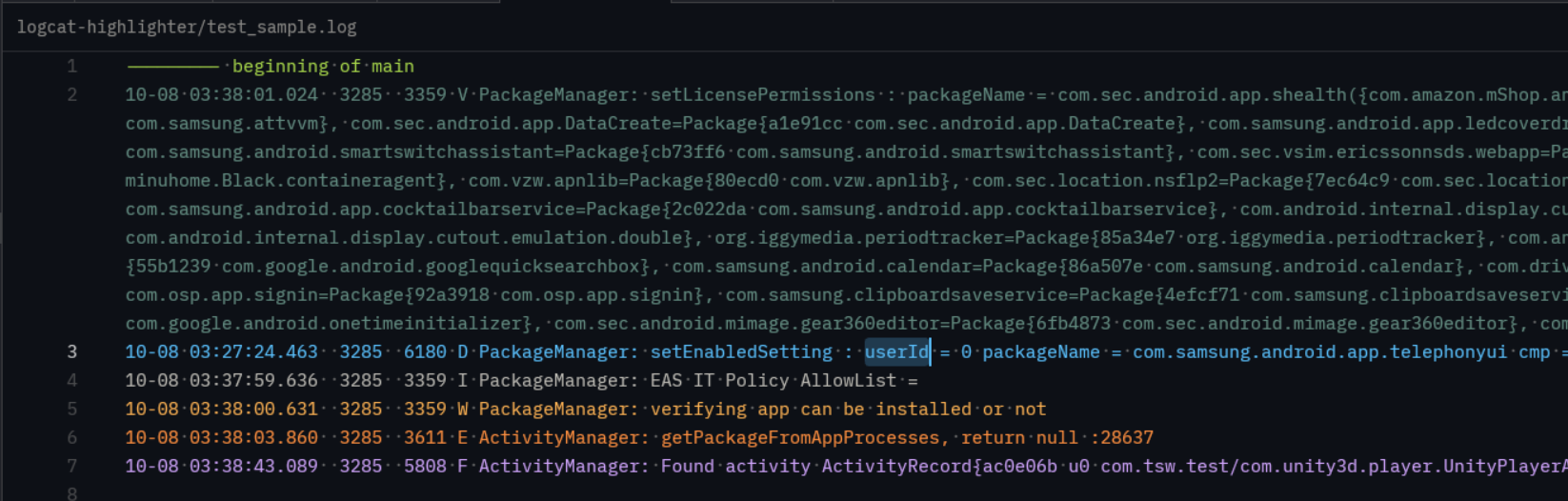
Features
- Level-based Highlighting: Distinct colors for Verbose, Debug, Info, Warning, Error, and Fatal logs.
- Smart Parsing: Powered by tree-sitter-logcat for accurate syntax highlighting.
- File Support: Automatically detects
.logand.logcatfiles.
Installation
This extension is compatible with editors that support Tree-sitter grammars.
Zed
To use this extension in Zed:
- Clone this repository.
- Link or copy it into your local Zed extensions directory.
Usage
Opening any file with a .log or .logcat extension will automatically trigger the highlighter.
Project Structure
languages/logcat: Contains the language configuration (config.toml) and syntax highlighting queries (highlights.scm).extension.toml: Extension metadata and grammar definitions.
License
This project is licensed under the MIT License - see the LICENSE file for details.