Hivacruz Theme
A dark blue theme.
How to install
With Forge Super installed, the button above opens the app on this extension, where you press Install. Nothing is installed until you do.
You can also open the Extensions panel in the app and search for Hivacruz Theme. The extension's id is hivacruz-theme.
Don't have Forge Super yet? Download it here.
README
From the extension's repository, written by its authors and not by Mentenaz. See the source.
Zed Hivacruz Theme
A dark blue theme for Zed.
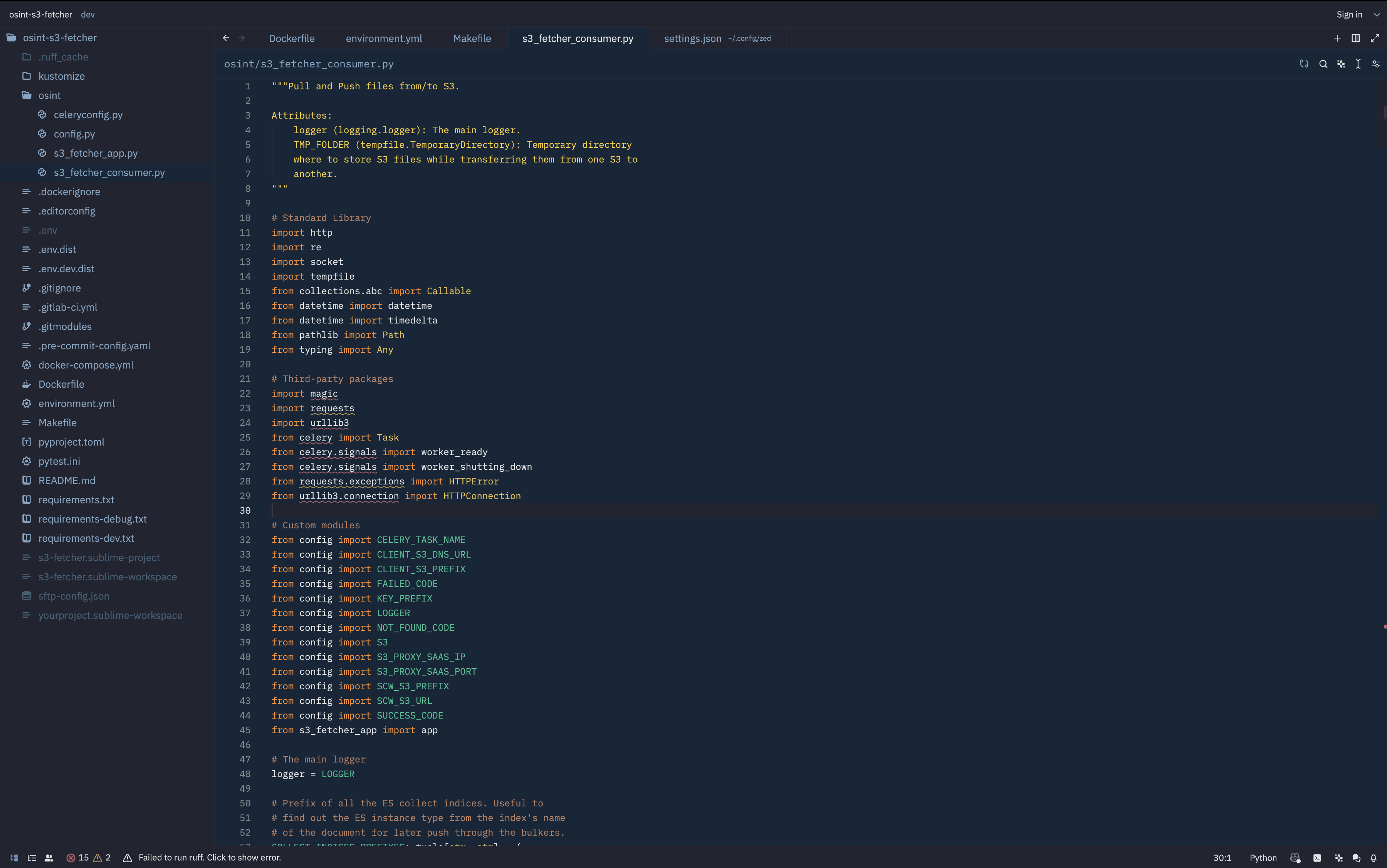
Installation
Place hivacruz.json in ~/.config/zed/themes, restart Zed and select it from the command palette (Cmd+Shift+P) or (Cmd+K Cmd+T).
Also this theme was added to Zed extensions.
Configuration
Here is the Zed configuration used that could be seen on the screenshot:
{
  "icon_theme": "Material Icon Theme",
  "collaboration_panel": {
    "button": false
  },
  "linked_edits": false,
  "git": {
    "inline_blame": {
      "enabled": false
    }
  },
  "ui_font_size": 14,
  "buffer_font_size": 12,
  "base_keymap": "SublimeText",
  "buffer_font_family": "RobotoMono Nerd Font Mono",
  "ui_font_family": ".SystemUIFont",
  "theme": {
    "mode": "system",
    "light": "Hivacruz",
    "dark": "Hivacruz"
  },
  "indent_guides": {
    "enabled": true,
    "line_width": 1,
    "active_line_width": 1,
    "coloring": "indent_aware",
    "background_coloring": "disabled"
  },
  "show_wrap_guides": true,
  "terminal": {
    "font_family": "RobotoMono Nerd Font Mono",
    "font_size": 11
  },
  "cursor_blink": true
}
Same theme in other apps
I made similar themes with the same colors for different applications. Here there are:
- Sublime Text theme: https://github.com/kinoute/hivacruz-sublime-theme
- VSCode Theme: https://github.com/kinoute/vscode-hivacruz-theme
- iTerm2: https://github.com/kinoute/hivacruz-itermcolors
- Nova: https://github.com/kinoute/hivacruz-nova-theme
- Typora Theme: https://github.com/kinoute/typora-hivacruz-theme
Credits
- Created by Yann Defretin.
- Colors inspired by Coda 2.5's Panic Palette by Cabel Sasser.