Hipster
14 bold terminal-style themes: the original Hipster Green from iTerm2/Tabby plus pink, purple, blue, red, amber, matrix, forest, midnight, mint, moss and two light ones
How to install
With Forge Super installed, the button above opens the app on this extension, where you press Install. Nothing is installed until you do.
You can also open the Extensions panel in the app and search for Hipster. The extension's id is hipster-green-theme.
Don't have Forge Super yet? Download it here.
README
From the extension's repository, written by its authors and not by Mentenaz. See the source.
Hipster for Zed
Bold, terminal-style themes for Zed. It started as a port of Hipster Green from iTerm2/Tabby and now has 14 variants.
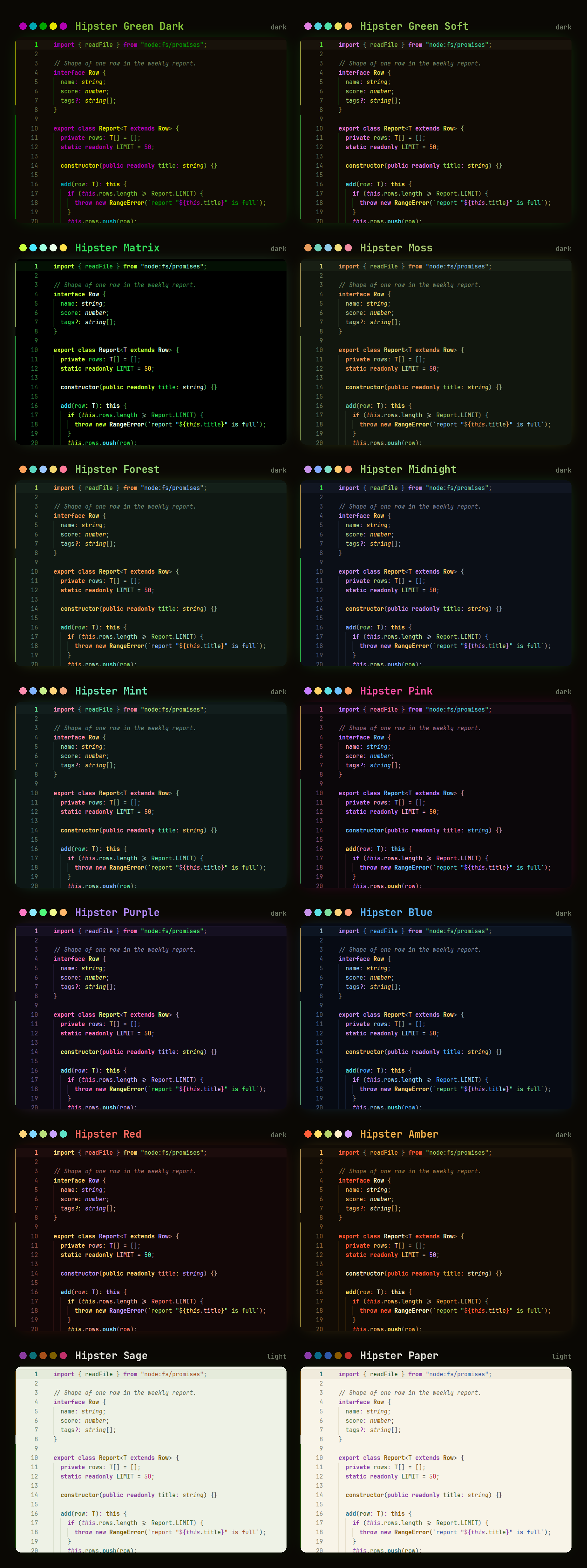
Install
In Zed, open the command palette, run zed: extensions, search for Hipster and install it. Then pick a variant with theme selector: toggle.
Variants
Click a name to see its full-size screenshot (shown with JetBrains Mono).
Dark:
- Hipster Green Dark: the original iTerm2/Tabby scheme, kept exact
- Hipster Green Soft: same colors, but the dim purple and blue are brighter so they're easier to read
- Hipster Matrix: pure black and only greens, like an old CRT
- Hipster Moss: muted earthy greens for long sessions
- Hipster Forest: deep pine background with warm fruit colors
- Hipster Midnight: blue-black background with neon green text
- Hipster Mint: teal dark with mint text and pink highlights
- Hipster Pink: neon pink, palette from the hipster-pink fork
- Hipster Purple: violet night with candy accents
- Hipster Blue: deep navy with electric blue text
- Hipster Red: dark red room with warm coral text
- Hipster Amber: orange, like an old amber monitor
Light:
- Hipster Sage: soft sage paper with green ink
- Hipster Paper: warm cream paper, like printed code
Every variant except the original keeps text at 4.5:1 contrast or better, and gives keywords, functions, types, strings and numbers their own colors. The original stays exact to the source scheme, so its purple and blue are a bit dimmer.
Editing the themes
All variants are generated from scripts/gen.py. Change a palette there and run:
python3 scripts/gen.py          # rewrites themes/hipster.json
python3 scripts/gen.py --check  # contrast report only
python3 scripts/distinct.py     # checks keywords, functions, types etc. look different
python3 scripts/preview.py      # rebuilds screenshots/preview.png
Don't edit the JSON by hand, it gets overwritten.
License
MIT