Forest Night Ethereal
A deep blue-slate aesthetic for Zed with muted forest green, teal, purple and amber accents.
How to install
With Forge Super installed, the button above opens the app on this extension, where you press Install. Nothing is installed until you do.
You can also open the Extensions panel in the app and search for Forest Night Ethereal. The extension's id is forest-night-ethereal-theme.
Don't have Forge Super yet? Download it here.
README
From the extension's repository, written by its authors and not by Mentenaz. See the source.
Forest Night Ethereal Theme for Zed
A deep blue-slate aesthetic for Zed with muted forest green, teal, purple, and amber accents.
Credits & Attribution:
This theme is a port for Zed created and maintained by bashln, based on the original Forest Night — Ethereal palette designed by Forrest Knight.
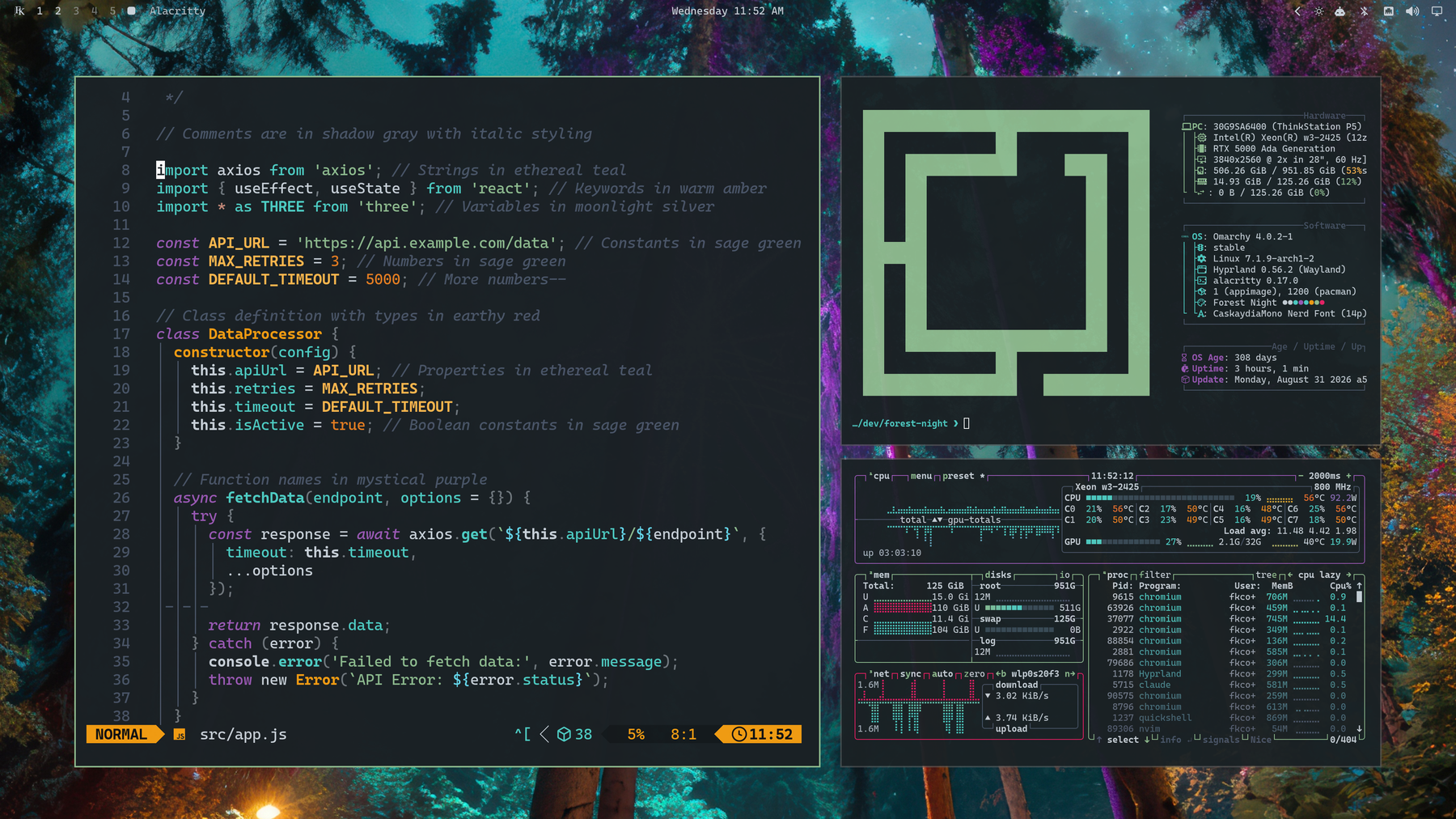
🎨 Themes Included
- Forest Night Ethereal (Solid / Opaque) — Full contrast with a deep blue-slate background (
#1a2125). - Forest Night Ethereal (Soft Blur) — Subtle frosted backdrop (~88% opacity) designed for blurred window compositing.
- Forest Night Ethereal (Deep Blur) — Pronounced glass / frosted look (~72% opacity) while retaining high text readability.
🧬 Color DNA
Core Shades
| Purpose | Hex | Name |
|---|---|---|
| Background | #1a2125 | Deep Blue Slate |
| Surface | #14191c | Dark Slate |
| Elevated | #222a30 | Lighter Slate |
| Deepest | #0d1113 | Darker Slate |
| Foreground | #c9d1d9 | Slate Gray Text |
| Light FG | #a8b3bd | Soft Slate Text |
| Dark FG | #6b7280 | Dimmed Slate Text |
| Selection | #3a4a55 | Cool Slate Blue |
| Muted | #4a5568 | Muted Gray |
Accents
| Role | Hex | Description |
|---|---|---|
| Primary | #8FBC8F | Forest Sage Green |
| Secondary | #4ECDC4 | Mint Teal / Cyan |
| Highlight | #66D9EF | Bright Cyan |
| Warning | #FFB74D | Amber Yellow |
| Orange | #E67E22 | Forest Orange |
| Error / Tag | #E91E63 | Crimson Pink / Red |
| Magenta | #9B59B6 | Lavender Purple |
Terminal Palette
| Color | Normal | Bright | Dim |
|---|---|---|---|
| Black | #1a2125 | #222a30 | #0d1113 |
| Red | #E91E63 | #c78a7a | #b8174e |
| Green | #8FBC8F | #8FBC8F | #739873 |
| Yellow | #F39C12 | #FFB74D | #c47d0e |
| Blue | #4ECDC4 | #66D9EF | #3ca49d |
| Magenta | #9B59B6 | #9B59B6 | #7c4792 |
| Cyan | #4ECDC4 | #66D9EF | #3ca49d |
| White | #c9d1d9 | #ffffff | #a8b3bd |
🚀 Installation
Option 1: Install as a Dev Extension (Local)
- Open Zed.
- Open the Command Palette (
Ctrl+Shift+P/Cmd+Shift+P). - Run
zed: install dev extension. - Select this repository folder (
zed-forest-night-ethereal-theme).
Option 2: Import via Zed Theme Builder
Import themes/forest-night-ethereal.json into the Zed Theme Builder.
✨ Enabling Blur in Zed
To enable background blur for the translucent variants, add the following to your Zed settings.json:
{
  "theme": "Forest Night Ethereal (Soft Blur)",
  "window_background_appearance": "blurred"
}
🖼️ Included Wallpapers
High-resolution companion wallpapers are available in assets/backgrounds/:
1-forest-night.jpg2-mesmeric-forest.png(Ashenvale by Forange)
📄 License
MIT License — see LICENSE.
Original palette by Forrest Knight. Ported for Zed by bashln.