Fjord
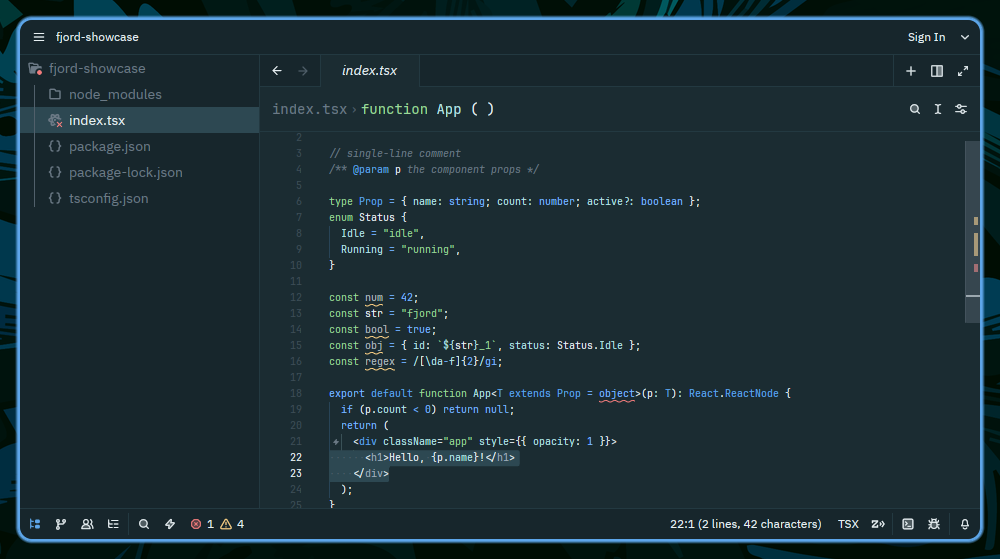
Dusk-blue base with soft leaf-green accents, cyan selections, and crisp blue/cyan separation.
How to install
With Forge Super installed, the button above opens the app on this extension, where you press Install. Nothing is installed until you do.
You can also open the Extensions panel in the app and search for Fjord. The extension's id is fjord-theme.
Don't have Forge Super yet? Download it here.
README
From the extension's repository, written by its authors and not by Mentenaz. See the source.
Fjord Theme for Zed
A dusk-blue base with soft leaf-green accents, cyan selections, and crisp blue/cyan separation for the Zed editor.
🎨 Color Palette
Core Colors
| Color | Name |
|---|---|
| background | background |
| backgroundAlt | backgroundAlt |
| surface | surface |
| line | line |
| foreground | foreground |
| muted | muted |
| mutedDim | mutedDim |
Accent Colors
📦 Installation
From Zed Marketplace
- Open Zed
- Open the Extensions panel (
Cmd+Shift+Xon macOS,Ctrl+Shift+Xon Linux/Windows) - Search for "Fjord"
- Click Install
Manual Installation
- Clone the theme to your config directory:
mkdir -p ~/.config/zed/themes/
git clone https://github.com/fjord-themes/fjord-zed.git --depth 1 ~/.config/zed/themes/fjord-zed
- Copy the theme file to your Zed themes directory:
cp ~/.config/zed/themes/fjord-zed/themes/fjord.json ~/.config/zed/themes/fjord.json
- Open the theme picker (
Ctrl+K Ctrl+Ton Linux/Windows,Cmd+K Cmd+Ton macOS) and select Fjord.
🔧 Configuration
The theme is designed to work transparently with your terminal colors while providing optimal contrast and readability in Zed.
🔄 Updates
This theme is automatically generated from fjord-core and deployed on every release. For an overview of all supported platforms and the full color palette, visit the Fjord GitHub page.
☕ Support My Work
If you enjoy the Fjord theme and find it useful, consider supporting my work:
📄 License
MIT License - see LICENSE file for details.
🤝 Contributing
For theme suggestions or issues, please open an issue on the Fjord GitHub page.