FIRRTL Source Locator
Trace FIRRTL/Chisel source locators (e.g. // @[reg.scala:255:{37,41}]) from Verilog/SystemVerilog back to Scala source locations.
How to install
With Forge Super installed, the button above opens the app on this extension, where you press Install. Nothing is installed until you do.
You can also open the Extensions panel in the app and search for FIRRTL Source Locator. The extension's id is firrtl-source-locator.
Don't have Forge Super yet? Download it here.
README
From the extension's repository, written by its authors and not by Mentenaz. See the source.
firrtl-source-locator
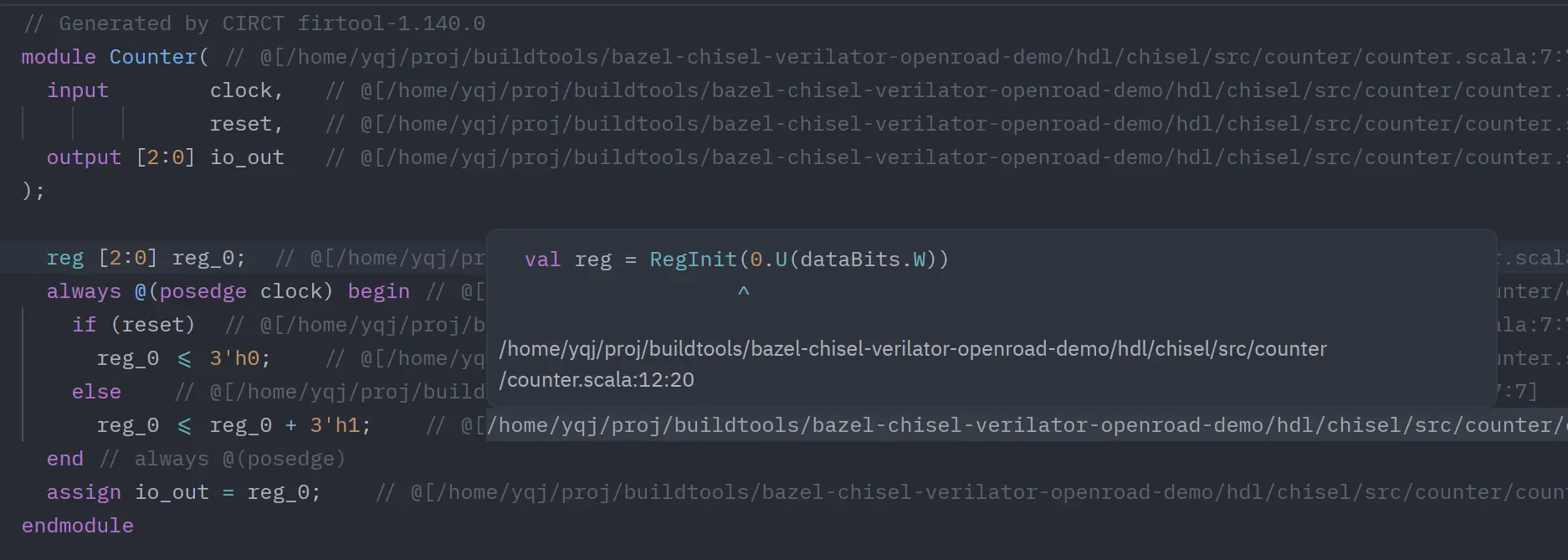
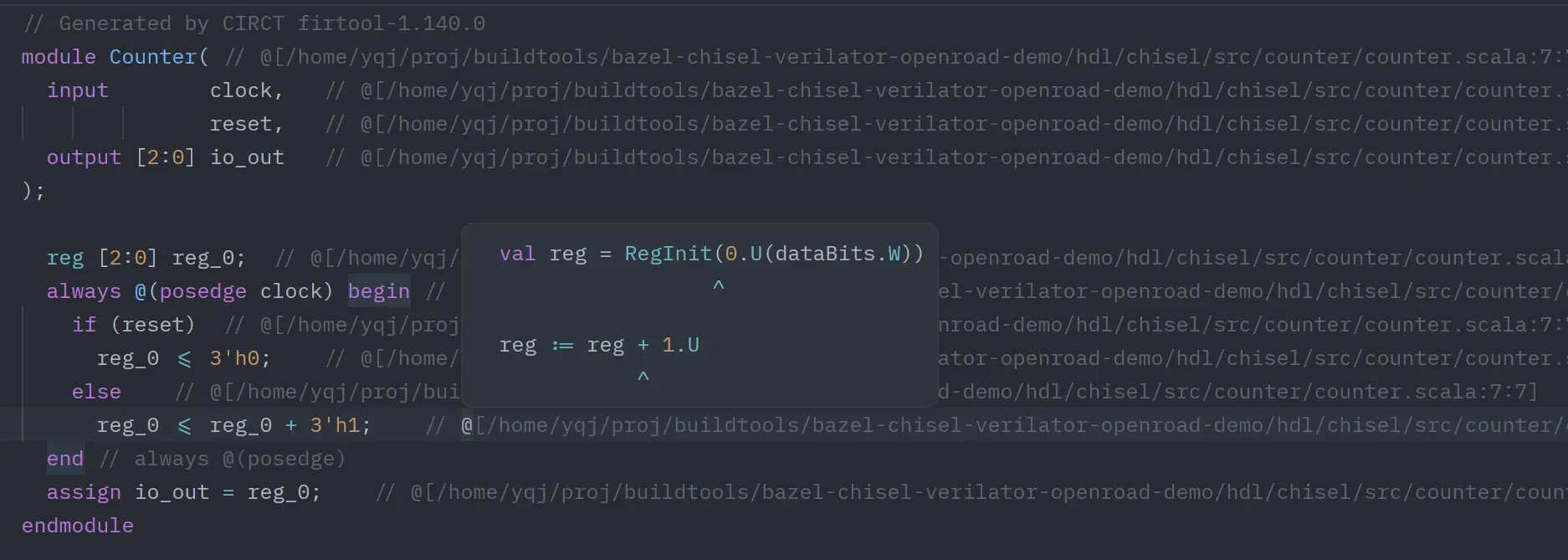
A Zed companion LSP extension for Verilog/SystemVerilog that parses FIRRTL/Chisel source locator comments (@[...]) and jumps back to Scala source locations.
Features
textDocument/definition- Jump from anywhere inside one locator comment to all mapped Scala locations.
- Always returns a multi-target list for one
@[...]block (for picker-based selection in Zed). - Supports inherited-path tokens like
:108:21. - Supports multi-column tokens like
:257:{27,31,48,72}.
textDocument/hover- On a locator token, shows a 3-line preview:
- mapped source code line
^column indicator line- expanded locator path (
path:line:col)
- On
// @[(expanded trigger range), shows a summary of all mapped targets.- Each locator entry is rendered as 2 lines (source line +
^line; multi-column entries share one^line).
- Each locator entry is rendered as 2 lines (source line +
- Uses fenced Markdown code blocks with language tags (
scala/firrtl/verilog/ etc.) for syntax highlighting in hover.
- On a locator token, shows a 3-line preview:
Note: this extension intentionally prioritizes Go to Definition for locator blocks (instead of DocumentLink) so one click can always produce the multi-target picker.
It now returns LocationLink targets with explicit column ranges for each mapped source point.
Server Resolution Strategy (PATH + GitHub Release)
This extension no longer builds the server on the host machine.
When Zed starts the language server, the extension resolves the server binary in this order:
- Optional override:
FIRRTL_SOURCE_LOCATOR_SERVER=/absolute/path/to/firrtl-source-locator-server[.exe]. - Search in
$PATHviaWorktree::which("firrtl-source-locator-server"). - If not found, download a prebuilt binary archive from GitHub release tag
v<extension-version>. - Extract into the extension workdir:
firrtl-source-locator-server-v<version>-<target>/
- Launch the resolved binary directly.
Supported release targets:
x86_64-unknown-linux-gnuaarch64-unknown-linux-gnux86_64-apple-darwinaarch64-apple-darwinx86_64-pc-windows-msvc
Error Reporting and Troubleshooting
If startup fails, Zed's language server status will show the reason (missing release tag, missing asset, download error, unsupported platform, etc.).
Common fixes:
# install your own server binary and expose it in PATH
which firrtl-source-locator-server

# or point the extension to a custom server binary
export FIRRTL_SOURCE_LOCATOR_SERVER=/absolute/path/to/firrtl-source-locator-server
If GitHub download fails, verify network access and confirm the release tag v<extension-version> includes your platform asset.
Development
# check extension wasm crate
cargo check

# run server parser tests
cargo test --manifest-path server/Cargo.toml
GitHub workflows:
.github/workflows/ci.yml: extension check + server tests..github/workflows/release-server.yml: build and publish release assets for supported targets.
Use in Zed
- Open Zed Extensions.
- Click
Install Dev Extension. - Select this project directory.
- Open
.sv/.vfiles and use Go to Definition on@[...]tokens. - Hover:
- on one token for single-target details,
- on
// @[for all-target summary.