Efa Dark Theme
A JetBrains-inspired dark theme for Zed with balanced contrast and refined syntax colors.
How to install
With Forge Super installed, the button above opens the app on this extension, where you press Install. Nothing is installed until you do.
You can also open the Extensions panel in the app and search for Efa Dark Theme. The extension's id is efa-dark-theme.
Don't have Forge Super yet? Download it here.
README
From the extension's repository, written by its authors and not by Mentenaz. See the source.
Efa Dark Theme for Zed
A dark theme extension for Zed, inspired by JetBrains IDEs and tuned for long coding sessions with balanced contrast.
Theme Preview
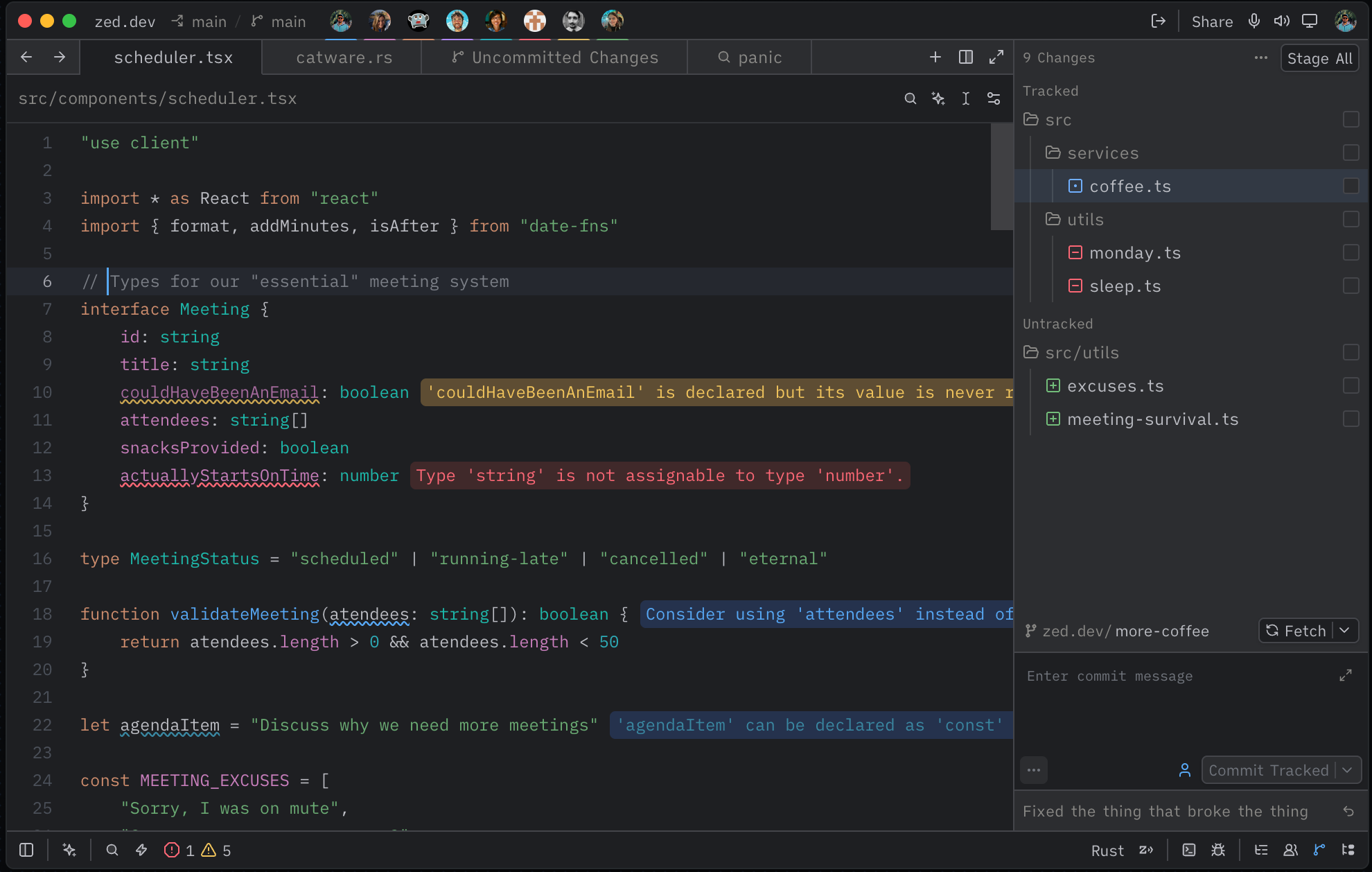
Efa Dark features:
- Deep dark background (
#1E1F22) for comfortable viewing - Vibrant but controlled syntax highlighting
- Distinct colors for keywords, strings, functions, and types
- Italic styling for comments, booleans, and constants
- Matching terminal ANSI palette
Repository Layout
This repository is packaged as a Zed extension:
.
├── extension.toml
├── screenshots/
│   └── efa-dark-theme-preview.png
├── themes/
│   └── efa-dark.json
├── LICENSE
└── README.md
Local Development & Testing
- Open Zed and run
zed: extensionsfrom the command palette. - Click Install Dev Extension.
- Select this repository folder.
- Open the theme selector with
ctrl-k ctrl-t(cmd-k cmd-ton macOS). - Select Efa Dark and verify UI/syntax colors.
If the theme does not appear, run zed: open log and check extension loading output.
Publishing to Zed Extensions
To publish this theme in the official Zed extension registry:
- Push this repository to GitHub.
- Fork
zed-industries/extensions. - In your fork, add this repo as a submodule:
git submodule add https://github.com/valyefimov/zed-theme-efa-dark.git extensions/efa-dark-theme
git add extensions/efa-dark-theme
- Add an entry to the top-level
extensions.tomlin the fork:
[efa-dark-theme]
submodule = "extensions/efa-dark-theme"
version = "1.0.0"
- Run:
pnpm sort-extensions
- Commit, push, and open a pull request to
zed-industries/extensions.
Once the PR is merged, the extension becomes available in Zed’s extension store.
Configuration
Set the theme directly in Zed settings:
{
  "theme": "Efa Dark"
}
Or keep dynamic light/dark mode:
{
  "theme": {
    "mode": "system",
    "light": "One Light",
    "dark": "Efa Dark"
  }
}
Color Palette
- Background:
#1E1F22 - Foreground:
#BCBEC4 - Blue (functions):
#56A8F5 - Orange (keywords):
#CF8E6D - Green (strings):
#6AAB73 - Cyan (numbers):
#2AACB8 - Magenta (properties):
#C77DBB - Teal (types):
#16BAAC
Author
Yefimov Valentyn
License
MIT — see LICENSE.