Deps
Intelligent dependency insights across package ecosystems
How to install
With Forge Super installed, the button above opens the app on this extension, where you press Install. Nothing is installed until you do.
You can also open the Extensions panel in the app and search for Deps. The extension's id is deps-language-server.
Don't have Forge Super yet? Download it here.
README
From the extension's repository, written by its authors and not by Mentenaz. See the source.
Deps
Zed editor extension for deps-lsp — intelligent dependency insights across package ecosystems.
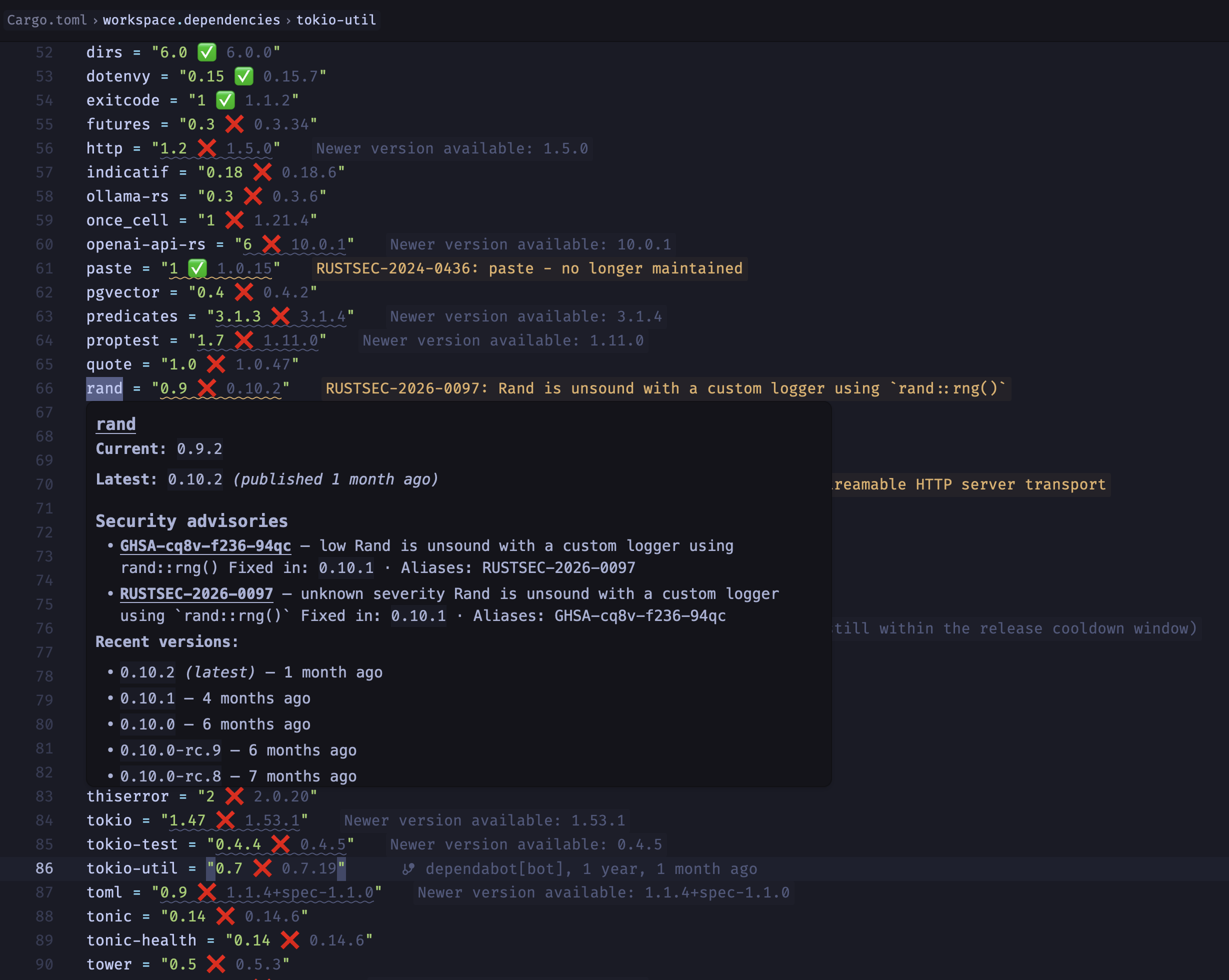
Features
- Version Hints — Inline status indicators (up-to-date / outdated)
- Hover Information — Version list with resolved version from lock file
- Diagnostics — Warnings for outdated, unknown, yanked, or unsatisfiable-requirement dependencies, plus OSV.dev-backed vulnerability advisories
- Release-Freshness Signal — Flags a "latest" version still inside its cooldown window, mirroring GitHub Dependabot's default 3-day package cooldown
- Code Actions — Quick fixes via
Cmd+.to update dependencies, resolve unsatisfiable version requirements, and upgrade to a patched version for known vulnerabilities - Code Lens — "Update N outdated dependencies" batch update on every open manifest
- Autocomplete — Package names, versions, and feature flags
Supported Ecosystems
| Ecosystem | Manifest |
|---|---|
| Rust | Cargo.toml |
| Node.js | package.json |
| JavaScript / TypeScript (Deno, JSR/npm) | deno.json, deno.jsonc |
| Python | pyproject.toml |
| Go | go.mod |
| Ruby | Gemfile |
| Dart / Flutter | pubspec.yaml |
| GitHub Actions / Docker Compose | YAML files |
| Maven | pom.xml |
| Java | build configs |
| Gradle | build.gradle |
| Gradle Kotlin DSL | build.gradle.kts |
| Swift (SPM) | Package.swift |
| PHP (Composer) | composer.json |
| C# (NuGet) | .csproj, .fsproj, .vbproj, Directory.Packages.props |
[!NOTE]
deps-lspalso supports Python'srequirements.txt/constraints.txtand NuGet'spackages.config, but Zed has no built-in language for either file type, so this extension cannot route them to the language server.
Installation
- Open Zed
- Press
Cmd+Shift+Xto open Extensions - Search for Deps
- Click Install
How It Works
The extension launches deps-lsp as a language server. On first use, it resolves the binary in this order:
- Cached path from a previous run
- System PATH (
deps-lspexecutable) - Auto-download from GitHub releases (platform-specific archive)
Old downloaded versions are cleaned up automatically after each update.
Configuration
Configure in Zed settings (Cmd+,):
{
  "inlay_hints": {
    "enabled": true
  },
  "code_lens": "on",
  "diagnostics": {
    "inline": {
      "enabled": true
    }
  },
  "lsp": {
    "deps-lsp": {
      "initialization_options": {
        "inlay_hints": {
          "enabled": true,
          "up_to_date_text": "✅",
          "needs_update_text": "❌ {}"
        },
        "diagnostics": {
          "outdated_severity": "hint",
          "unknown_severity": "warning",
          "yanked_severity": "warning",
          "unsatisfiable_severity": "warning",
          "vulnerabilities_enabled": true
        },
        "freshness": {
          "enabled": true,
          "cooldown_secs": 259200
        },
        "code_lens": {
          "enabled": true
        }
      }
    }
  }
}
The top-level inlay_hints, code_lens, and diagnostics.inline are Zed editor settings — off by default — required to actually display hints, the "Update N outdated dependencies" lens, and inline diagnostic messages. The lsp.deps-lsp.initialization_options block configures deps-lsp itself; see deps-lsp's configuration reference for the full option list.