Claude Code Inspired Dark
A dark theme for Zed inspired by Claude and Anthropic's brand colors with semi-transparent backgrounds.
How to install
With Forge Super installed, the button above opens the app on this extension, where you press Install. Nothing is installed until you do.
You can also open the Extensions panel in the app and search for Claude Code Inspired Dark. The extension's id is claude-code-inspired-dark.
Don't have Forge Super yet? Download it here.
README
From the extension's repository, written by its authors and not by Mentenaz. See the source.
Claude Code Inspired Dark Theme for Zed
A dark theme for the Zed editor inspired by Claude and Anthropic's brand colors, featuring warm orange accents and a comfortable coding environment.
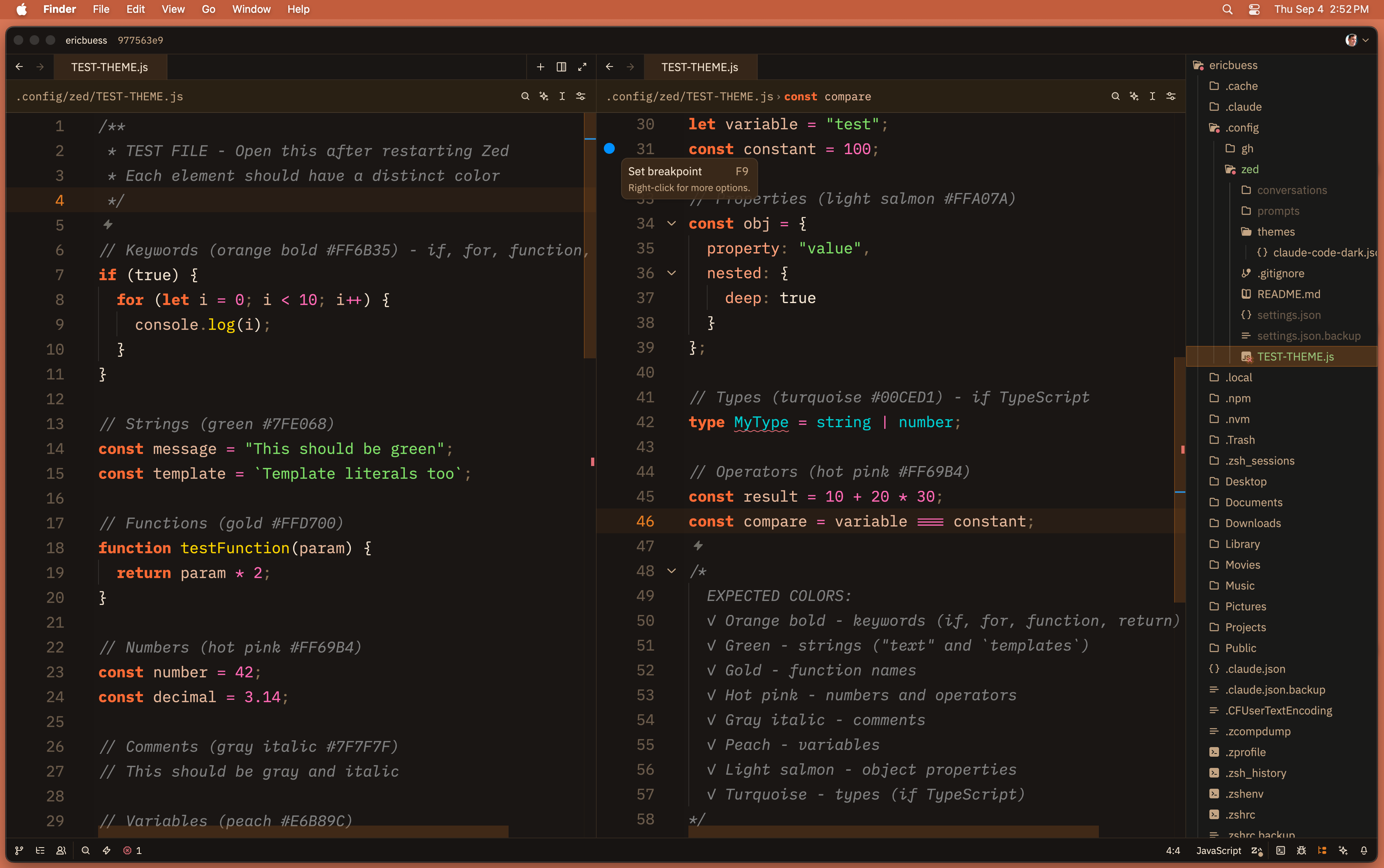
Features
Design Philosophy
- Warm color palette: Based on Anthropic's brand colors with orange accents
- Comfortable contrast: Cream text on dark brown backgrounds for reduced eye strain
- Semantic highlighting: Each syntax element has a distinct, purposeful color
Color Palette
Primary Colors
- Claude Orange:
#E67D22- Keywords, accents, active elements - Light Orange:
#FFB38A- Functions, hover states - Cream:
#F5E6D3- Primary text, high contrast - Muted Tan:
#C4A584- Secondary text, parameters
Syntax Highlighting
- Keywords: Claude orange with increased weight
- Functions: Light orange, italicized for methods
- Strings: Warm green (#98C379)
- Numbers: Coral (#FF9966)
- Comments: Muted tan, italicized
- Types: Soft blue (#61AFEF) for contrast
- Variables: Cream for readability
UI Elements
Editor
- Dark backgrounds with warm brown undertones
- Active line highlighting with subtle orange accent
- Orange-tinted scrollbars and selections
- Line numbers in muted colors, active line in orange
Panels & Surfaces
- Layered backgrounds for depth perception
- Slightly lighter surfaces for panels and sidebars
- Consistent border colors throughout
Status Indicators
- Git: Green (created), Orange (modified), Red (deleted)
- Diagnostics: Warm palette for errors/warnings/info
- Success: Warm green matching the overall theme
Terminal Colors
Full ANSI color palette with warm-tinted variants matching the Claude aesthetic.
Installation
Option 1: Install from Zed Extension Registry (Coming Soon)
Once published, you'll be able to install directly from Zed:
- Open Zed's command palette (
cmd-shift-pon macOS) - Type "Extensions" and select "zed: extensions"
- Search for "Claude Code Inspired Dark"
- Click Install
Option 2: Install as Dev Extension
- Clone this repository:
git clone https://github.com/ericbuess/claude-code-inspired-dark.git
-
In Zed, open the command palette (
cmd-shift-pon macOS) -
Type "install dev extension" and select
zed: install dev extension -
Navigate to the cloned repository folder and select it
-
Restart Zed when prompted
-
Open settings (
cmd-,) and select "Claude Code Inspired Dark" from the theme picker
Customization Tips
Desktop Wallpaper
For a cohesive look, consider using a complementary wallpaper:
- Solid dark backgrounds work best
- Orange or warm-toned gradients complement the theme
- Claude's brand coral (
#D97757) or theme orange (#E67D22) create a unified aesthetic
macOS System Settings
For optimal visual experience with the Claude theme:
- Window Tiling: Drag Zed window to top-middle of screen
- Creates a small border around the window
- Allows wallpaper to show through on all sides
- Enhances the transparency effect
- Reduce Motion: Turn OFF in System Settings → Accessibility → Display
- Allows smooth theme transitions and hover effects
- Cursor Colors: Match cursor to theme colors
- System Settings → Accessibility → Display → Pointer
- Set to match theme accent colors
File Structure
.
├── extension.toml           # Extension manifest
├── themes/
│   └── claude-code-inspired-dark.json   # Theme definition
├── screenshot.png           # Theme preview
├── README.md               # This file
└── LICENSE                 # MIT license
Repository
This theme is open source and available at: https://github.com/ericbuess/claude-code-inspired-dark
Credits
Created with Claude's assistance for optimal VM distinction and brand consistency.